
MARKETING TEAM PROJECT
Team Marketing Project | PAIGE Help Kiosk
The challenge was bigger than simply designing another airport kiosk. Our team looked at the entire curb-to-gate experience through the eyes of an older traveler. Research showed that airports can become confusing, physically demanding and stressful as passengers deal with long walks, unclear navigation, TSA, changing gates and an increasing reliance on self-service technology. The goal became simple: how can we make getting through an airport feel effortless?
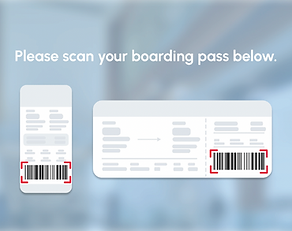
Our solution was PAIGE, a personalized airport assistance system built around an intelligent kiosk. A traveler scans their boarding pass and PAIGE immediately knows their flight information, provides a simple terminal map and connects them to the help they need. Instead of making passengers search for assistance, the system brings assistance to them—from directions and accessibility support to an Uber-like airport cart that can take them to a restaurant, restroom or directly to their gate. The experience follows the passenger rather than forcing the passenger to figure out the airport.
What makes the idea powerful is that it began by designing specifically for seniors but ultimately became better design for everyone. The research identified a need for simplicity, physical comfort and proactive assistance, while user testing reinforced a “less is more” approach: fewer clicks, clear labels, accessible options and an effortless interface. PAIGE turns the airport from something you have to navigate into a service that helps navigate it for you.

Review Full Paige Presentation
Paige Screen Help Examples




For the PAIGE airport project, I learned much more than how to design a kiosk. I worked through a real human-centered marketing and design process; starting with a specific audience, identifying their frustrations, developing solutions, testing them and refining the idea based on feedback. The project began with older travelers but led to an important insight: designing a simpler experience for seniors can create a better airport experience for everyone.
Marketing & Design Tools I Learned
-
Audience identification — defining a specific target rather than designing for “everyone.”
-
Customer research — understanding behaviors, frustrations, physical limitations and emotional needs.
-
Problem statements — turning research into a clear business/design challenge.
-
Customer journey & scenario mapping — following the traveler from curb → TSA → assistance → transportation → gate.
-
Pain-point analysis — identifying where the existing airport experience breaks down.
-
Needs statements — translating frustrations into opportunities such as accessible help, physical comfort and stress reduction.
-
Brainstorming / idea generation — exploring wall maps, AI-assisted TSA, transportation and intelligent kiosks before choosing a direction.
-
Storyboarding — showing how a real passenger would experience the idea rather than just explaining the technology.
-
UI/UX design — simplifying information, navigation and choices for the intended user.
-
Prototyping & user testing — putting the concept in front of people and listening to what worked and what didn’t.
-
Iteration — responding to feedback such as “less is more,” fewer clicks, clearer labels, language options and accessibility features.
-
Brand development — turning the functional idea into PAIGE, a recognizable service with its own identity and personality.
-
Concept presentation — learning how to take research and turn it into a convincing, understandable creative solution.
I learned that good design doesn’t start with what something looks like...it starts with understanding who you’re designing for. PAIGE taught me how to use research, journey mapping, prototyping, user testing and iteration to turn a human problem into a branded experience.